Should You Be Using AWS Control Tower to Improve Your Security and Resilience Posture?
2026-07-03
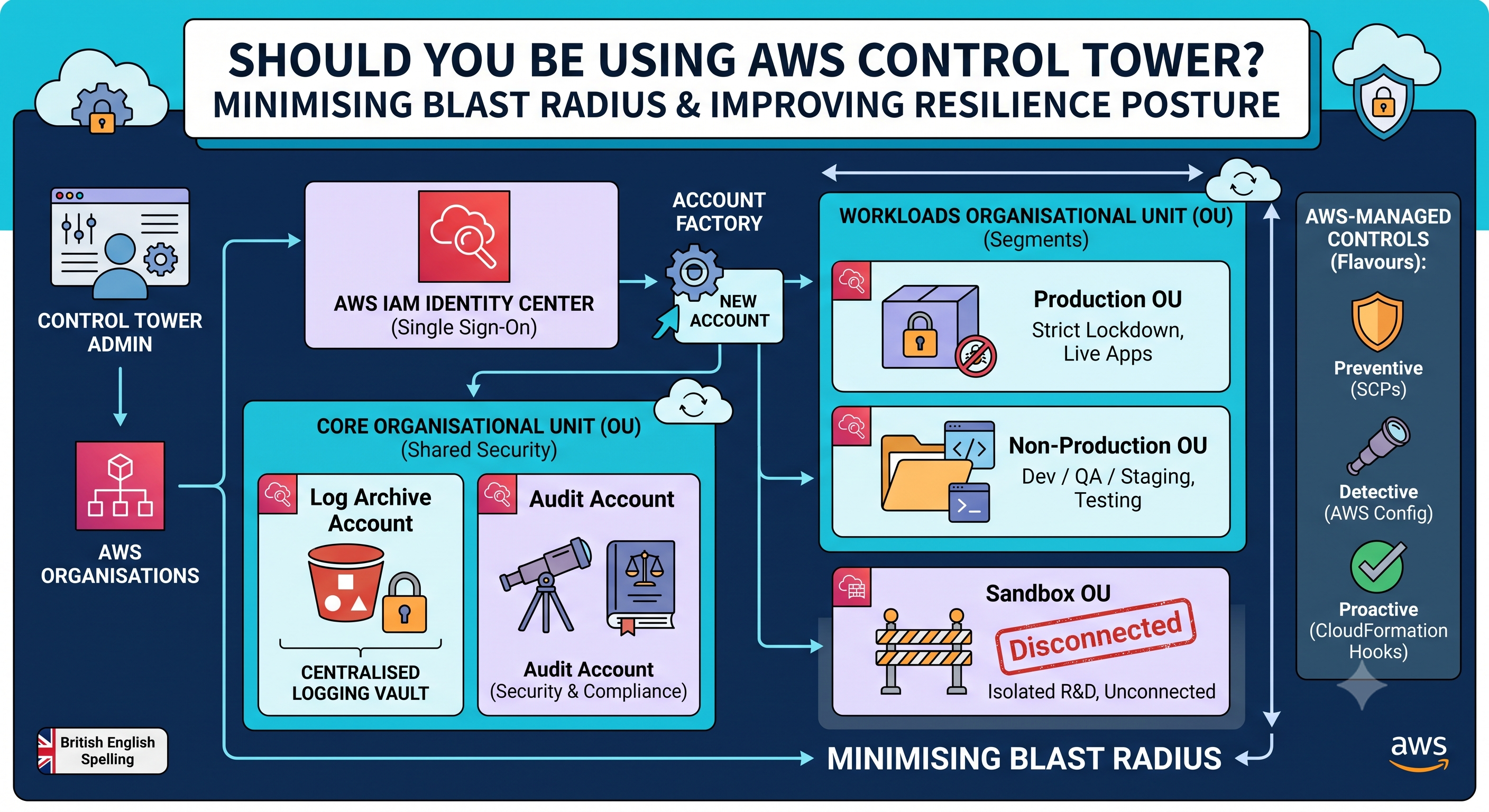
If you are running more than a handful of AWS accounts—or planning to—this is the exact question you need to ask yourself.
Look, let’s be honest: managing a single AWS account is easy. But the moment your team grows, you hit a wall. Security risks multiply, tracking who owns what bill becomes an administrative nightmare, and trying to keep dev environments from accidentally touching production starts to feel like playing Whac-A-Mole.
To solve this, AWS heavily pushes a multi-account strategy. It is a brilliant architectural pattern, but manually setting up, configuring, and securing dozens of accounts is a recipe for burnout and human error.
That is where AWS Control Tower comes into play. It is essentially an automated orchestrator that sets up a secure, multi-account AWS environment (what AWS calls a Landing Zone) based on actual best practices, saving you weeks of manual scripting and click-ops.
Let’s break down when you actually need it, what it does under the hood, and how it keeps your cloud environments safely isolated.
The Core Use Cases: When Does Control Tower Make Sense?
You do not need Control Tower for a weekend side project. But you absolutely should consider it if you find yourself in any of these scenarios:
- You are Scaling Fast: If your engineering team is growing and you need to hand out AWS accounts like candy without worrying about someone accidentally exposing a database to the public internet.
- You Have Strict Compliance Standards: If you are dealing with HIPAA, PCI-DSS, or GDPR, Control Tower translates abstract regulatory paperwork into actual, automated technical checks.
- You Need Centralised Security: Instead of configuring security tools inside every single individual account, Control Tower funnels all your logs and alerts into a single source of truth. It makes life significantly easier for your security or centralised DevOps teams.
What Actually Happens Under the Hood?
Control Tower isn't a magical, standalone service. Instead, think of it as a smart wrapper. It sits on top of several native AWS governance tools and automates their setup so you do not have to build them from scratch.
| AWS Service | What Control Tower Does With It |
|---|---|
| AWS Organisations | Automatically builds your multi-account hierarchy and applies top-level security policies. |
| AWS IAM Identity Center | Gives your team a centralised single sign-on (SSO) portal to access all your accounts safely. |
| AWS CloudTrail & AWS Config | Instantly turns on continuous tracking for API activity and resource changes across the entire setup. |
| AWS Service Catalog | Powers the Account Factory, a self-service tool your team can use to spin up pre-configured, safe AWS accounts. |
How It Controls and Separates Your Environments
The fundamental rule of modern cloud security is minimising your blast radius. If a developer makes a catastrophic mistake or a credential leaks in a development environment, it must be structurally impossible for that issue to bleed into your production apps.
Control Tower enforces this boundary through a few key layers.
1. The Core Infrastructure Accounts
When you initialise Control Tower, it automatically spins up a highly restricted Security Organisational Unit (OU) containing two dedicated, shared accounts:
- Log Archive Account: A centralised, tamper-proof vault. It collects copy-protected CloudTrail and AWS Config logs from every single account in your organisation. Even an administrator in a development account cannot delete or alter these logs.
- Audit Account: A read-only environment meant for your security team. It allows them to monitor baseline configurations and run compliance checks across the organisation without having destructive, administrative privileges.
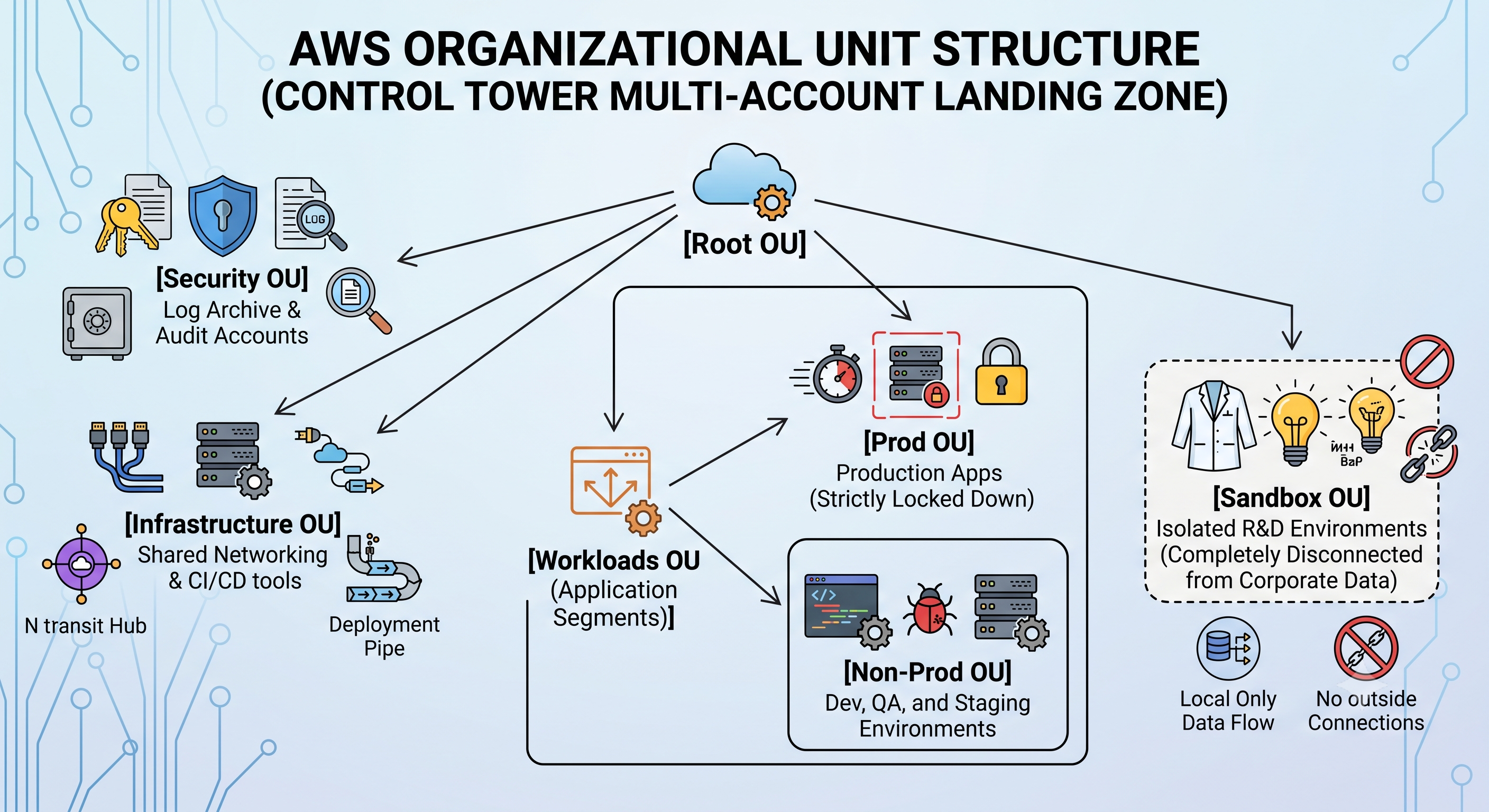
2. Strategic OU Segmentation
Control Tower uses AWS Organisations to group your accounts into OUs. Think of OUs as folders. Any policy you apply to a folder automatically applies to every account inside it.
A standard, battle-tested layout for separating environments usually looks like this:
3. Enforcing Boundaries with Controls (Guardrails)
To keep these environments truly separate, Control Tower applies high-level rules called Controls. These prevent configuration drift and stop people from breaking your environment boundaries. They come in three distinct flavours:
- Preventive Controls: These flat-out block actions using Service Control Policies (SCPs). For example, a preventive control applied to your Production OU might completely deny anyone the ability to create an unencrypted S3 bucket or disable logging.
- Detective Controls: These watch your accounts continuously using AWS Config. If a developer in a Dev Account opens a database port to the public internet, a detective control flags it as non-compliant and pings your security team.
- Proactive Controls: These check resources before they are even deployed (usually inside a CI/CD pipeline using CloudFormation Hooks), rejecting the deployment if it breaks your security posture.
A Quick Tip on Flexibility: If you do not want to commit to the full Control Tower landing zone infrastructure, AWS offers a controls-dedicated experience. This lets you apply these managed security controls directly to your existing AWS Organisations setup without the overhead of the full framework.
4. Automated Isolation via the Account Factory
When a team needs a new environment, they use the Account Factory. Instead of copy-pasting settings or cloning an old account (and risking cloning old security flaws), the Account Factory builds a pristine, isolated account from an approved blueprint.
The moment it is created, it is automatically hooked up to central logging, given default, isolated network VPCs, and tied into your central identity provider.
The Verdict: Should You Use It?
If you are a solo developer or a tiny startup with just one or two accounts, Control Tower is probably overkill and might just add unnecessary configuration complexity.
But if you are managing a growing team, handling sensitive customer data, or constantly worrying about whether your staging environment is truly isolated from production, yes, you absolutely should use it. It takes the guesswork out of cloud governance and gives you a resilient, enterprise-grade security foundation right out of the box.